Jackery Solar Generator v2: Quick Overview
Can a 23.8-pound power station and two lightweight solar panels provide dependable off-grid power for camping, RV travel, emergencies, and home backup? The Jackery Solar Generator v2 makes a convincing case for portable, high-output power, particularly when quick wall charging and flexible solar placement matter more than the lowest possible purchase cost. We would consider it a strong shortlist candidate for mobile backup, but not a replacement for a large, permanently installed home battery.
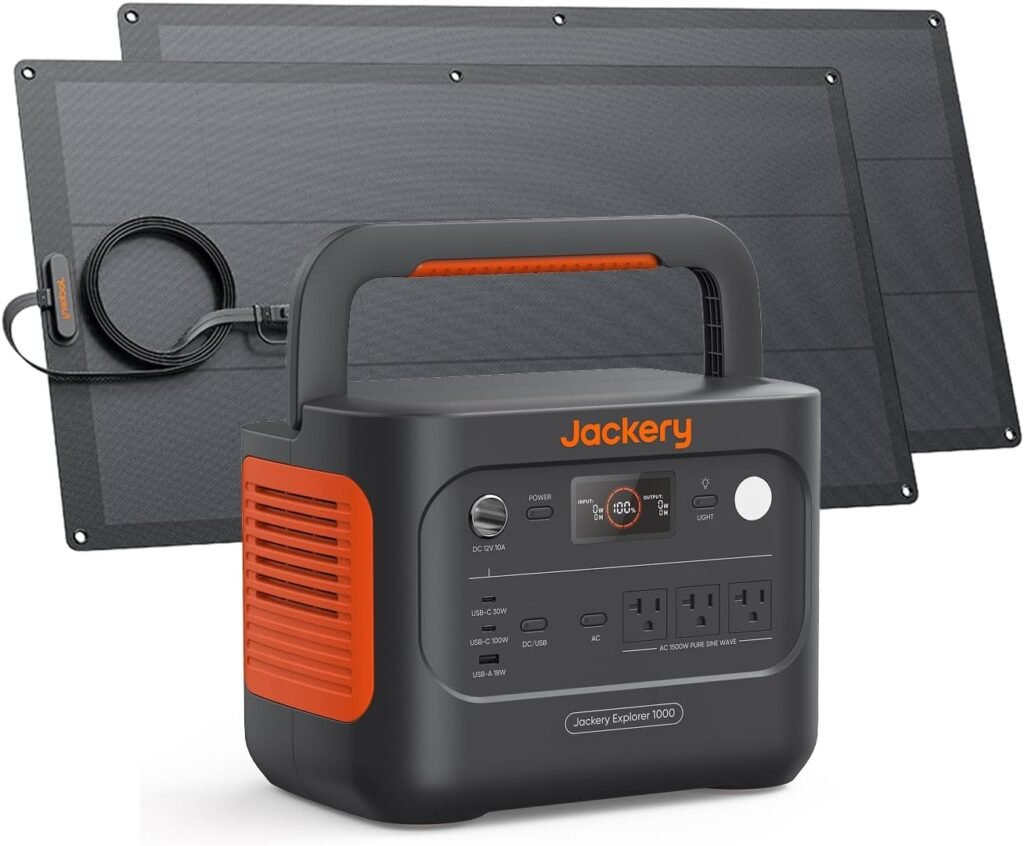
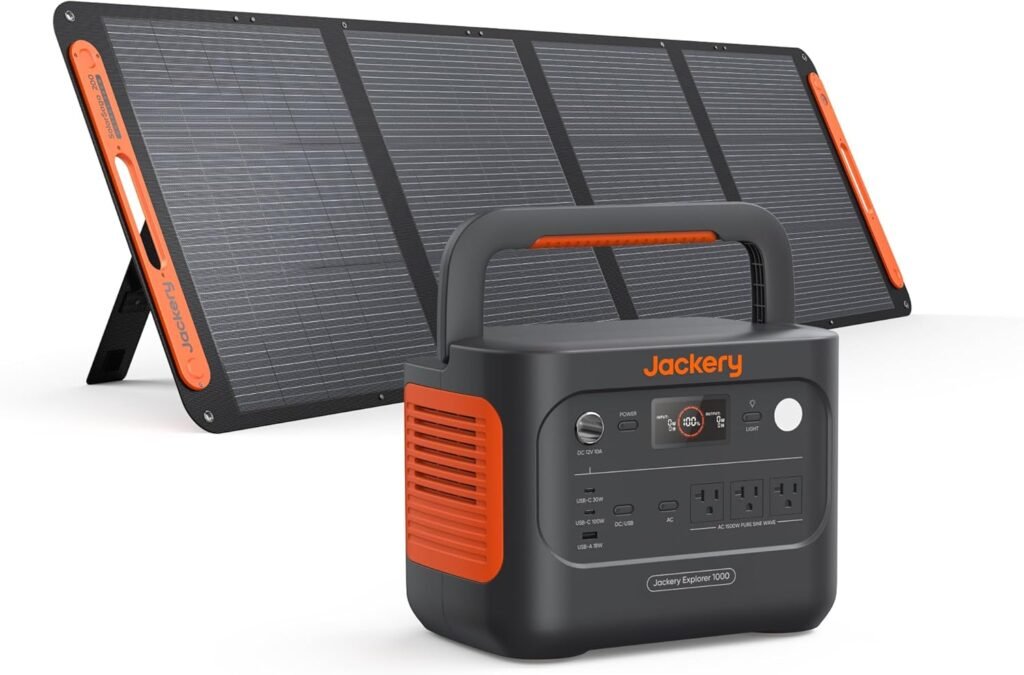
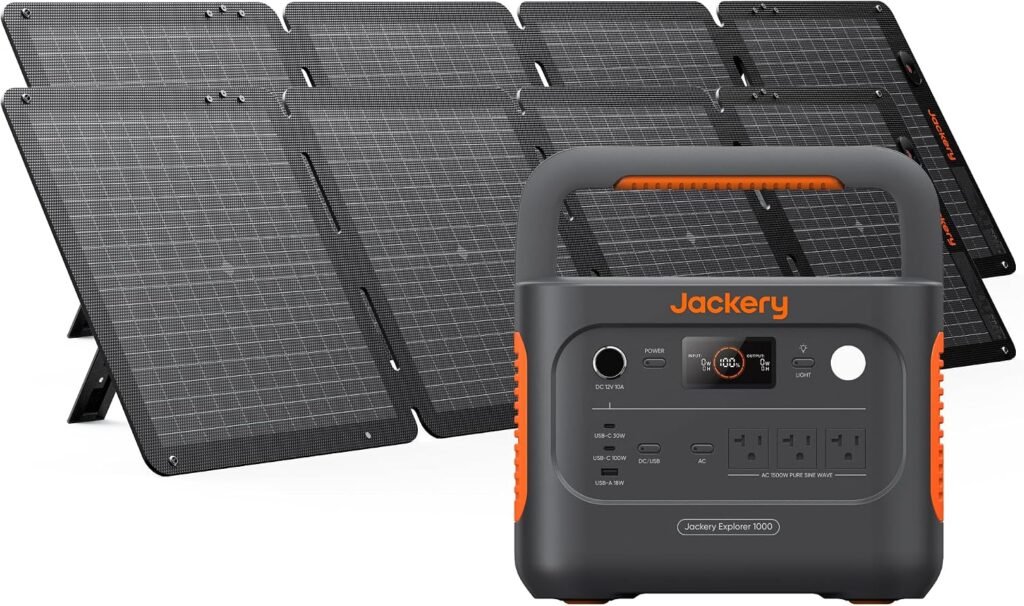
The bundle includes the Explorer v2 power station, an AC charging cable, two SolarSaga 100W Light panels, two 3-metre flat cables, and user manuals. Its headline figures are a 1,070Wh battery, 1,500W continuous AC output, 3,000W surge output, and the ability to power up to eight devices at once.
Our early view is straightforward: the Jackery Solar Generator v2 suits shoppers who value portability, high output, flexible panels, rapid AC charging, and smartphone controls. Those seeking maximum watt-hours per dollar, multi-day heating or cooling, or automatic home transfer switching should compare larger systems. The specifications below come from the supplied product information; customer-experience evidence was not supplied with the listing data.

Jackery Solar Generator v2 Specifications and Design
The Explorer v2 is relatively easy to carry for a 1,500W-class power station, weighing 23.8 pounds. That is manageable for a vehicle, campsite, or emergency-storage shelf, although the complete kit becomes noticeably heavier once both 4.52-pound panels and their cables are packed. We would treat the station as portable rather than effortless to move repeatedly over long distances.
Three ratings need separating. The 1,070Wh figure describes stored energy, the 1,500W figure describes continuous AC output, and the 3,000W figure describes short-term surge capacity. A high-capacity battery does not automatically run every appliance, and a strong inverter does not mean the battery will power a heavy load for many hours.
The station uses a LiFePO4 battery. Jackery states that it should retain at least 70% capacity after 4,000 charge cycles, but this is a manufacturer specification, not a guaranteed result for every owner. Actual ageing depends on temperature, charging habits, storage level, discharge depth, and how frequently the unit is operated near its limits.
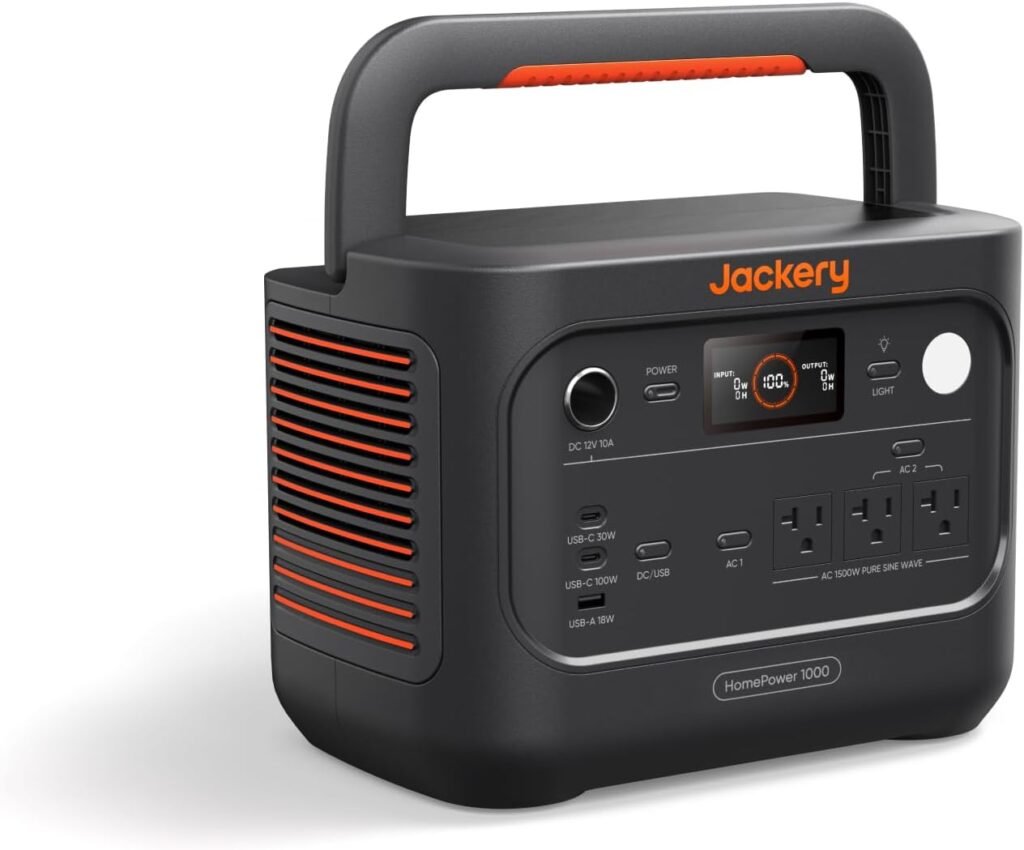
Connectivity covers AC outlets, a 100W USB-C Power Delivery port, USB-A, and DC outputs. That combination is practical for charging laptops, phones, cameras, lights, and selected small appliances together. To plan a load test, we would list each device’s running wattage, add headroom for startup surges, and compare the total with the continuous rating rather than relying on the largest number printed on the box.
For vehicle travel, the handle and compact power-station format should be more convenient than transporting a larger home battery. At a campsite or balcony, the separate lightweight panels make temporary positioning easier, while emergency storage benefits from having both AC and solar charging available. We would still store the station somewhere dry, ventilated, and accessible enough to inspect regularly.
Power Output, Battery Runtime, and Appliance Compatibility
The 1,500W AC rating places the Jackery Solar Generator v2 in a useful middle ground. It has the stated output for selected refrigerators, electric pots, power tools, and some air-conditioners, but the appliance must remain within the continuous limit after startup behaviour is considered. The 3,000W surge rating may help with a brief motor or compressor start, yet it should not be treated as permission to run a sustained 3,000W load.
Runtime estimates are easier when we allow for inverter and conversion losses. A 100W device drawing continuously would theoretically use 1,000Wh in 10.7 hours before losses; a 500W load would reach the same nominal capacity in about 2.1 hours; and a 1,000W load would do so in roughly 1.1 hours. Real usable time will be shorter, so we would apply a loss allowance rather than promise those figures.
Our calculation method is simple: multiply each device’s wattage by the number of operating hours, add an allowance for conversion losses, and compare the result with the station’s capacity. For example, a 60W laptop used for five hours consumes about 300Wh on paper, while a refrigerator’s daily requirement depends on its duty cycle rather than its compressor’s label alone.
Compressors, motors, heating elements, and air-conditioner systems can start differently from their printed running wattage. A refrigerator that appears modest on its specification plate may briefly demand more power, while a heating appliance can draw near its rated figure continuously. We would test essential equipment before an outage and record the station’s actual display readings.
Powering up to eight devices is convenient for a camp or communications setup, but it does not mean every port can deliver its maximum rating simultaneously. The best fit is short-duration emergency backup, mobile work, refrigeration support, lighting, and communications. Extended whole-home operation, especially for electric heating or cooling, requires more stored energy and usually a larger solar array.

Charging Speed and Solar Panel Performance
The advertised AC charging options are a useful distinction. Emergency mode is described as charging from 0% to 100% in one hour, while the default 1.7-hour mode is intended to support battery health. The faster setting is not automatic: users must enable the emergency charging function in the Jackery App before each one-hour session.
We would not interpret either figure as a fixed result in every situation. Starting battery level, temperature, active output loads, wall-outlet conditions, and the selected charging mode can all change the time shown. If the app setting has not been enabled, the station defaults to the slower mode, which could surprise someone expecting the advertised emergency rate.
The two panels create a nominal 200W solar array. That is the combined rated input under favourable conditions, not a guaranteed 200W delivered to the battery. Clouds, shade, panel angle, heat, seasonal sunlight, cable losses, and changing sunlight can reduce the measured figure substantially.
The panels are advertised with 25% conversion efficiency and IBC technology. Conversion efficiency describes how effectively the panel turns available sunlight into electricity under specified conditions; it does not promise that the battery will receive 25% of every available solar resource or maintain a fixed charging speed outdoors.
Our setup sequence would be:
- Unfold both panels fully and connect the two 3-metre flat cables.
- Place them in unobstructed sunlight with their surfaces aimed toward the strongest available light.
- Open the app and monitor solar input rather than judging performance by appearance.
- Reposition the panels when shade, angle, or falling input reduces the displayed wattage.
Emergency AC charging and solar charging solve different problems. A wall outlet can support the advertised one-hour mode when correctly configured, whereas ordinary outdoor conditions rarely let a 200W nominal array reproduce that result consistently.
Flexible, Weather-Resistant SolarSaga 100W Light Panels
Each SolarSaga 100W Light panel weighs 4.52 pounds, and Jackery describes it as 56% lighter than traditional rigid panels. That weight advantage is meaningful for camping, RV storage, and temporary balcony setups, where a panel that one person can position easily is more practical than a rigid module that needs permanent support.
The stated flexibility allows the panel to bend up to degrees. This can help when positioning it over curved vehicle roofs, RV surfaces, balconies, or uneven mounting locations. Flexibility improves placement options, but it does not remove the need for careful support; sharp creases, concentrated pressure, and unsupported edges can still damage a lightweight panel.
The panels carry an IP68 waterproof and dustproof claim, along with IEC-certified durability and stated resistance to salt spray. Jackery also lists an operating environment from -40°F to 185°F. We would keep the environmental rating separate from safe battery-operation conditions and follow the manual for the station itself, particularly in extreme temperatures.
Care is uncomplicated but worth doing consistently. Avoid sharp folds, inspect the cables and connectors before every trip, clean the surface gently without abrasive materials, and keep the power station protected from rain even when the panels are positioned outdoors. Disconnecting cables before packing also reduces strain at the connector points.
Temporary mounting requires more attention than simply laying a panel down. We would secure the panels against wind, keep them away from foot traffic, protect the cables from snagging, and consider theft risk when leaving them unattended. A curved mounting location may improve sunlight exposure, but cable strain and movement can undermine the benefit.
App Controls, Quiet Charging, and Safety Features
The Jackery App adds controls that the physical station cannot provide by itself. It can enable the emergency charging function, show battery health, display solar input and output activity, and manage charging behaviour. For owners who leave the kit in an RV, tent area, or home office, that monitoring can make it easier to spot an unexpected load before the battery is depleted.
The listed 30dB quiet charging mode is aimed at bedrooms, tents, and nighttime use. A low-noise mode should be more comfortable than a constantly audible cooling fan, but perceived sound varies with the load, cooling demand, surface beneath the station, and background noise. We would test it in the room where quiet operation matters instead of assuming the quoted figure describes every operating condition.
ChargeShield 2.0 is presented as Jackery’s smart-charging and protection system. Electronic safeguards are helpful, but they do not replace correct wiring, clear ventilation, dry surroundings, compatible cables, or sensible load management. We would keep ventilation openings unobstructed, avoid wet locations for the station, and disconnect equipment before moving it.
LiFePO4 chemistry, the 4,000-cycle retention claim, and electronic protection may support long ownership. They cannot guarantee a fixed ten-year service life in every environment, because storage conditions and usage patterns matter. The practical aim should be careful operation rather than treating the battery as maintenance-free.
For first use, we would follow this checklist:
- Install the app and update firmware if an update is offered.
- Charge the station fully using the supplied AC cable.
- Inspect every connector and cable for damage.
- Test each output with a low-power device.
- Connect the panels and record the baseline solar input in clear sunlight.
What Customers Are Saying About the Jackery Solar Generator v2
The supplied product information does not include a verified-buyer rating or review count, so we cannot responsibly quote an average score or claim that a particular opinion is widespread. That limitation matters: published specifications tell us what Jackery states, while customer reviews would show how the kit behaves with named appliances, actual weather, and repeated charging.
When reviewing buyer feedback for the Jackery Solar Generator v2, we would give the greatest weight to comments that identify the device used, its wattage, charging time, weather conditions, and number of repeat cycles. A brief statement such as “works great” provides much less evidence than a report showing a refrigerator’s measured draw or the input recorded from the panels under cloud cover.
Station feedback and panel feedback should also be separated. Comments about portability, appliance output, fan noise, battery runtime, app setup, and fast charging concern the Explorer v2. Reports about flexibility, cable convenience, positioning, wind, and reduced solar output concern the SolarSaga Light panels. Combining them would make the ownership picture less useful.
Several issues deserve specific scrutiny if verified reviews are available at publication time: whether users found the app straightforward, whether they remembered to enable emergency charging, whether the cables suited their setup, how much solar input remained in cloudy conditions, and whether the fan became audible under heavy loads. Differences may reflect appliance startup demands, ambient temperature, firmware, sunlight, or expectations based on nominal ratings.
We would therefore treat isolated anecdotes cautiously and look for repeated, detailed patterns. Until an actual rating and review total are supplied, the fair conclusion is not that buyers are satisfied or dissatisfied, but that customer-experience evidence remains unverified for this review.
Who Should Buy This Jackery Solar Generator?
The strongest audience includes campers, RV owners, photographers, remote workers, and households seeking portable support for refrigeration, communications, lighting, and selected appliances. The Jackery Solar Generator v2 combines a useful inverter class with a moderate energy store and a compact solar bundle, making it better suited to short trips and mobile backup than permanent whole-home energy storage.
It also fits people who value a fast wall-charge option and smartphone monitoring. We would especially recommend it to buyers comfortable configuring the app before using emergency charging, since the one-hour feature depends on that step rather than simply plugging the station into an outlet.
Different requirements point elsewhere. Shoppers planning multi-day high-wattage heating or cooling, very large solar expansion, automatic home transfer switching, or the lowest-cost watt-hour capacity should compare larger or differently configured systems. A portable station cannot overcome a daily energy demand that is much greater than its battery and solar input can replenish.
Our decision process would be:
- List essential devices and their running wattages.
- Find startup or surge requirements for compressors, motors, and tools.
- Estimate daily energy use in watt-hours, including operating time.
- Decide whether a nominal 200W portable solar array suits the location and expected weather.
- Confirm that the verified bundle price, warranty, and app requirement are acceptable.
In practice, the kit could support a refrigerator and communications equipment for limited outage periods, run a laptop and lights at camp, or top up devices from an RV roof or balcony. We would test those exact loads before depending on the system during an emergency.
How the Jackery Solar Generator v2 Compares With Alternatives
Two named alternatives commonly considered in this category are the EcoFlow DELTA and BLUETTI AC180. A fair comparison requires more than looking at the power-station headline: we would check battery chemistry, usable watt-hours, AC output, surge behaviour, charging modes, solar-input flexibility, app functions, weight, included panels, cables, adapters, shipping, and warranty coverage.
Against the EcoFlow DELTA 2, the Jackery bundle’s clearest stated distinction is the inclusion of two lightweight flexible panels, along with app-controlled emergency charging and a 30dB quiet charging mode. Buyers should verify the DELTA 2’s current configuration and whether its listing includes solar hardware before comparing prices. Recharge behaviour and solar-input limits also need checking on the live listings rather than assuming that similarly named packages are equivalent.
The BLUETTI AC180 is another relevant comparison for shoppers prioritising output headroom or higher-demand appliances. We would compare its published AC output, battery capacity, weight, charging modes, and whether a panel bundle is included. Without current specification and pricing data for that exact configuration, we cannot claim that it is lighter, more powerful, cheaper, or faster than the Jackery package.
We would choose by measured need rather than brand familiarity. Prioritise usable watt-hours for runtime, inverter output for appliance compatibility, solar input for off-grid recovery, and total carried weight for travel. The Jackery Solar Generator v2 is most differentiated here by its lightweight flexible-panel package and portable output, not by a claim that it dominates every rival category.
Prices should only be compared when verified at publication time and when both listings include comparable accessories. A station-only offer can look cheaper than a complete solar kit while providing less practical off-grid capability.
Price, Ownership Costs, and Overall Value
Value should be judged across the complete package: Explorer v2 station, two 100W panels, two flat cables, AC charging cable, app controls, LiFePO4 battery chemistry, emergency charging, and quiet-mode features. A station-only comparison would overlook the cost and convenience of the included flexible solar hardware, while a bundle comparison must ensure that competing products include equivalent panels and connection accessories.
Once a valid price is available, two simple measures help. Divide the purchase price by the battery’s watt-hours to calculate cost per watt-hour, then divide it by the continuous AC output to calculate cost per watt. Those figures can be compared with equivalent EcoFlow DELTA and BLUETTI AC180 packages, but only after confirming their current capacities, output ratings, included accessories, and listing prices.
Ownership value also includes panel portability, warranty support, possible cable or accessory replacement, storage conditions, battery-cycle expectations, and the convenience of checking input and output through the app. Paying more may make sense for buyers who genuinely need flexible mounting, faster emergency charging, quieter operation, or a lighter complete kit.
Pros and Cons
Pros
- Portable power-station format paired with unusually lightweight flexible solar panels
- High continuous AC output for selected refrigerators, tools, cooking appliances, and mobile equipment
- LiFePO4 battery chemistry with a stated 4,000-cycle retention specification
- App controls for monitoring, charging management, and emergency-charge activation
- Quiet charging mode designed for more comfortable nighttime use
Cons
- One-hour emergency charging requires app activation before each session
- Nominal solar capacity will vary substantially with shade, clouds, angle, heat, and season
- The complete station-and-panel kit weighs more than the power station alone
- Not intended to replace a larger whole-home battery for extended high-wattage heating or cooling
Key Takeaways
- The bundle combines a 1,070Wh LiFePO4 power station with 1,500W continuous AC output and two lightweight 100W flexible solar panels.
- Emergency AC charging requires activation in the Jackery App; the normal charging mode is listed as 1.7 hours.
- The solar panels improve portability and mounting flexibility, but their 200W nominal rating will vary with real outdoor conditions.
- This is a stronger fit for camping, RV travel, mobile work, and short emergency backup than for extended whole-home heating or cooling.
Frequently Asked Questions
Can the Jackery Solar Generator v2 really charge from 0% to 100% in one hour?
The product description advertises one-hour AC emergency charging, but users must enable the emergency charging function in the Jackery App before each session. The default mode is described as 1.7-hour charging, and actual timing can vary with battery level, temperature, active loads, and outlet conditions.
Will the two SolarSaga 100W Light panels always deliver 200W?
No. The panels provide a nominal 200W combined rating under favourable conditions. Clouds, shade, heat, angle, season, cable losses, and sunlight intensity can reduce the input shown by the station.
Is the Jackery Solar Generator v2 suitable for a refrigerator?
It may be suitable for selected refrigerators because the station is rated for 1,500W continuous AC output and 3,000W surge output. Buyers should check the refrigerator’s running and startup demands and test the exact appliance before relying on it during an outage.
What price should shoppers use when assessing this bundle?
Shoppers should verify the live checkout price, bundle contents, delivery terms, returns policy, and warranty before calculating value.
Disclosure: As an Amazon Associate, I earn from qualifying purchases.